A no-nonsense 2026 GPU buying guide that exposes the industry's biggest pricing trick: identical chips (like the 5070 Ti) selling from $799 to $999+ based on heatsinks and RGB alone. It breaks down what actually affects performance versus pure marketing paint. For PC builders who want to stop overpaying and put every dollar into real frames.
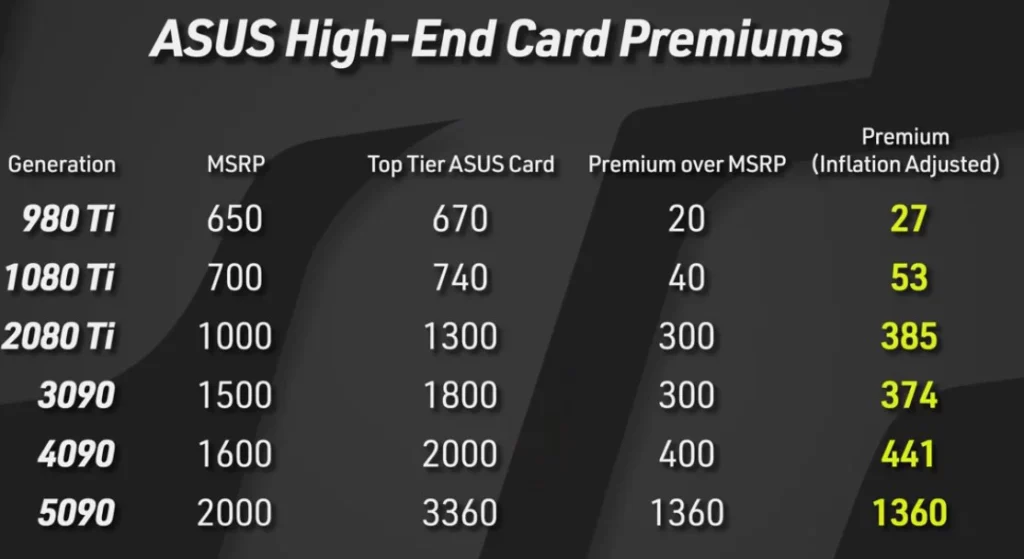
Have you noticed how ridiculous the graphics card market has become lately? Even with identical hardware chips, entry-level models retail for $799, while those so-called “flagship,” “OC edition,” or “premium” cards dare to demand $999 or more.
Does this extra cash actually deliver the performance you’re looking for? Today, we’re going to peel back the label on the “biggest GPU industry scam” and see what you’re really paying for.
1. Same Heart, Why Pay 30% More?
Buying a graphics card is a lot like buying a car. The GPU chip (like a 5070 Ti) is your engine, while the heatsink and RGB lighting are just the paint and interior. Manufacturers will try to sell you on:- “We have a stronger power delivery system!”: Like upgrading from 60A to 80A inductors, which provides almost zero tangible benefit for the average gamer.
- “We have higher out-of-the-box clock speeds!”: In reality, they just tweaked a value in the BIOS settings.
- “We feature stunning RGB lighting!”: Meanwhile, they intentionally strip lighting from entry-level models just to differentiate tiers.
The truth is: Unless you’re a professional overclocker pushing world records with liquid nitrogen (LN2), that “premium” build quality is irrelevant for 99.9% of users. That extra money you spent is likely just buying you peace of mind rather than actual frames.
2. Reality Check: When the ‘Budget’ Card Wears a ‘Flagship’ Mask
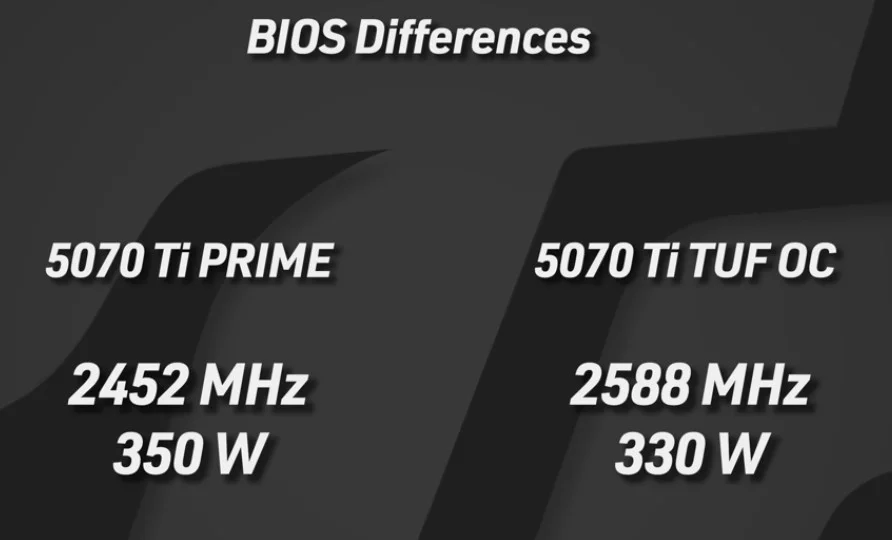
To prove our point, we ran an experiment: we took an ASUS 5070 Ti Prime (entry-level) priced around $850 and flashed it with the BIOS of a $1,050 Tough edition card.
The results were eye-opening:- Negligible Performance Gains: After the flash, even though the factory clock was boosted by 130MHz+, actual 4K testing (Steel Nomad) showed a frame rate improvement of less than 1 FPS.
- Lower Power Consumption: Strangely, the card using the “flagship” BIOS averaged about 20-25W lower power draw under the same load.
- Temperature Stays Flat: Even with the stock heatsink, temperatures remained perfectly in line with the flagship model’s specs under identical fan curves.
The conclusion is clear: Manufacturers use software (BIOS) to artificially throttle entry-level cards to trick you into shelling out for their “premium” models.
3. The ‘Free Lunch’ Guide: How to Flash Your VBIOS
If you own a budget-tier card and want to optimize its potential, follow these steps. Warning: There are risks involved. Always back up your original BIOS before starting!
1. Essential Toolkit
- GPU-Z (Verification & Backup): Official Download
- NVFlash 64 (Flashing Tool): Official Download
- TechPowerUp BIOS Database (Find your target BIOS): Access Database
2. Three-Step Process
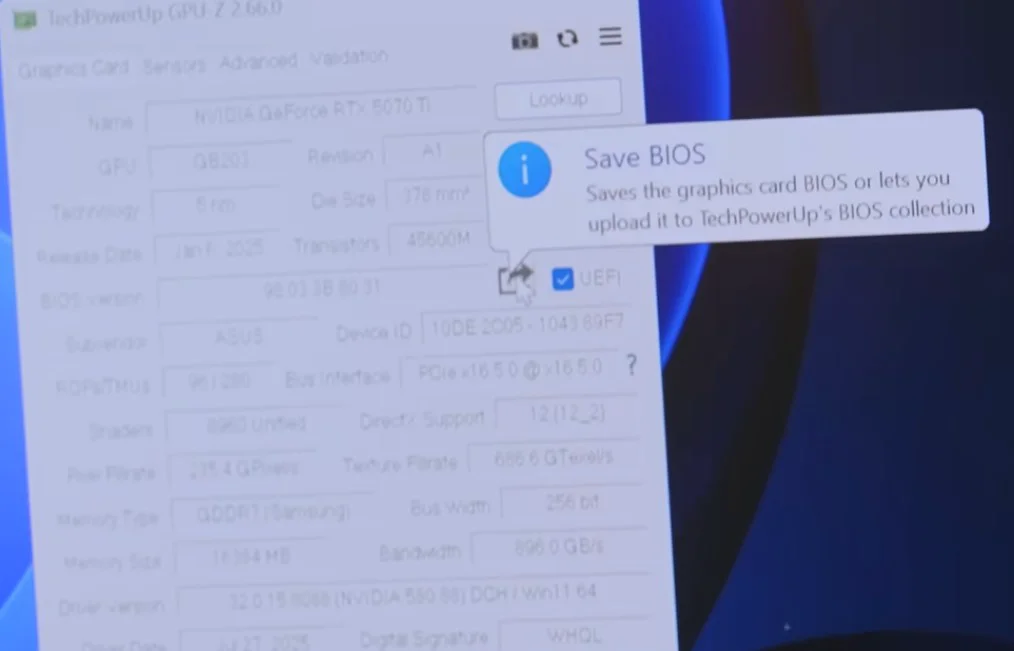
- Step 1: Backup (Your Safety Net): In GPU-Z, click the share icon next to the BIOS version and select “Save to file” to secure your stock BIOS.
- Step 2: Force Flash: Open your Command Prompt (CMD) and execute
nvflash64 --override. This parameter is crucial as it bypasses Sub-ID restrictions between different models. - Step 3: Reboot and Transform: After restarting, your system should recognize your entry-level card as the high-end flagship version, granting you access to higher power limits and factory clocks.
4. The Honest Truth About Building PCs
Do yourself a favor: Stop paying the “RGB tax” and falling for three-fan marketing gimmicks.
Instead of spending an extra $200 on a “top-tier” 5070 Ti, put that money toward the next tier up and snag an MSRP 5080. That’s a real performance leap that beats any software-based overclocking trickery.
FAQ:
Will flashing the BIOS void my warranty?
As long as you flash the original BIOS back before requesting a warranty claim and the card hasn't suffered physical damage, you are generally safe.
What if I brick my card?
If your CPU has integrated graphics, use that to boot and use NVFlash to restore your backup. If not, you’ll need a second cheap GPU to boot and fix it.
Why didn’t my 5070 Ti get faster after the flash?
Because the hardware (the GPU chip) is identical. Modern cards are already heavily optimized; flashing usually only unlocks power headroom rather than raw silicon speed.
Ready to build a smarter rig? Discover more advanced hardware tips and optimization secrets over at VGoods Lab!