![[Practical Guide] Build an Automated YouTube AI Intelligence Hub with n8n, OpenClaw, and RSSHub](https://www.vgoodslab.com/wp-content/uploads/2026/04/processed-2026-04-19T102438.648.webp)
In an age of information overload, manually tracking niche video content—like high-end hardware reviews or cutting-edge AI news—is a massive drain on time. Standard RSS feeds often only provide headlines, while direct scraping is frequently thwarted by aggressive anti-bot mechanisms like YouTube’s Captcha.
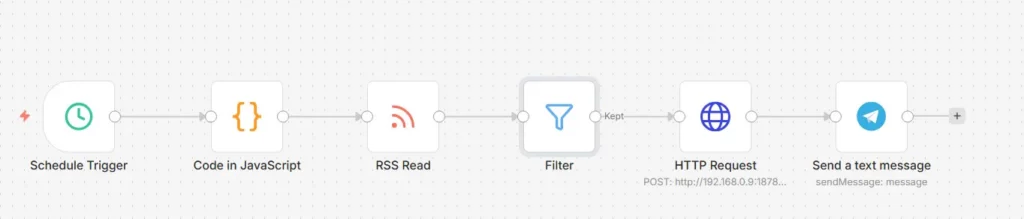
This guide documents an event-driven ingestion architecture powered by your local HomeLab. By using n8n to orchestrate workflows, RSSHub to bypass API blocks, and OpenClaw to drive headless browsing via Browserless, we’ve achieved 100% automation—from subscription and deep analysis to clean, structured notifications.
Architecture Overview & Computing Distribution
To ensure system stability and performance, workloads are distributed across optimized local nodes:
- Orchestration Hub (n8n): Manages the workflow, handles batch processing, and executes logic gates.
- Anti-Ban Gateway (RSSHub): Deployed via local Docker to bypass YouTube’s API restrictions on datacenter IP addresses.
- Visual Navigator (Browserless): Runs on a compute-heavy node (like an R730). It is remotely invoked via the CDP protocol to render dynamic pages, extract long-form subtitles, and parse video descriptions.
- Decision Engine (OpenClaw): Acts as your local AI agent gateway (deployed on a low-power node like a J1900). It receives tasks from n8n, directs Browserless to scrape content, and calls LLMs for deep summarization.
- Information Terminal (Telegram): Delivers beautifully formatted HTML-based daily intelligence briefings.
Core Configuration Steps
Step 1: Use RSSHub to Bypass YouTube’s 404 Restrictions
Because YouTube recently implemented strict time-based blocking on native /feeds/videos.xml endpoints for non-residential IPs, we skip direct scraping and use a local RSSHub instance as a proxy.
- Extract Channel ID: Navigate to the target YouTube channel, view the source code, and find the
channel_idstarting withUC. - Create Channel Array (Code Node): Use JavaScript in n8n to split the task stream.
JavaScript
const myChannels = [
  "UCI8iQa1hv7oV_Z8D35vVuSg", // Channel A
  "UCXGgrKt94gR6lmN4aN3mYTg", // Other channels...
];
return myChannels.map(id => ({ json: { channelId: id } }));
- Call RSSHub (RSS Read Node): Use your local RSSHub address in the URL expression to resolve blocking issues:
http://<Your_RSSHub_IP>:1200/youtube/channel/{{ $json.channelId }}
Step 2: Configure Time Filters to Prevent Type Mismatches
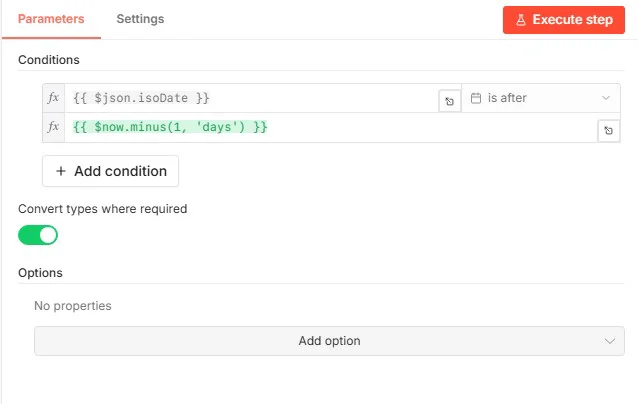
After fetching RSS data, you must filter for the latest updates within the last 24 hours. In the n8n Filter node:
- Key Toggle: Enable
Convert types where required. This forces the string-based timestamps from RSSHub into a usable system time format. - Time Condition: Set the comparator to
is afterand use the expression{{ $now.minus(1, 'days') }}.
Step 3: Connect the OpenClaw Gateway for Deep AI Analysis
This is the core processing node. We transmit video parameters to the agent using the HTTP Request node.
- Enable OpenClaw API: Ensure you have run
openclaw config set gateway.http.endpoints.chatCompletions.enabled truein your terminal and restarted the service. - Configure Auth: In the node settings, choose
Header Auth, with the keyAuthorizationand valueBearer YOUR_API_KEY. - Precise JSON Injection (Crucial):
- The
modelfield must be set to"openclaw", not the underlying LLM model name. - Include strict formatting instructions in your prompt to prevent Telegram node parsing errors.
- The
JSON
{
  "model": "openclaw",
  "messages": [
    {
      "role": "system",
      "content": "You are a professional tech and hardware analyst. When provided with a URL, please use your browser skill to visit and read the content or subtitles before summarizing."
    },
    {
      "role": "user",
      "content": "Please write a brief summary of the following video: [{{ $json.title }}], available at: {{ $json.link }}. 1. What are the key takeaways? 2. Is this worth watching from a hardware enthusiast's perspective? NOTE: Use plain text formatting only. Do not use any Markdown characters (like ** or # or *)."
    }
  ]
}
Step 4: Telegram HTML Formatting & Error Handling
LLM-generated Markdown symbols (like unclosed **) frequently trigger Bad Request: can't parse entities errors in the Telegram API.
1. Switch to HTML Mode
In the Telegram node’s Additional Fields, set Parse Mode to HTML.
2. HTML Expression Formatting
Use standard HTML tags (e.g., <b>) instead of Markdown and use the n8n cross-node syntax $('node_name') to reference video titles and links:
HTML
📺 <b>Latest YouTube Hardware Brief</b>

<b>Title:</b> {{ $('Filter').item.json.title }}
<b>Link:</b> {{ $('Filter').item.json.link }}

💡 <b>Deep Analysis:</b>
{{ $json.choices[0].message.content }}
3. Error Handling (If Node)
Insert an If node between the HTTP and Telegram nodes. If the AI returns Agent couldn't generate a response (usually due to network fluctuation or Captchas), route to the False branch to silently discard the update, keeping your notification feed clean.
Conclusion
By combining n8n orchestration, RSSHub anti-blocking, Browserless rendering, and OpenClaw agent reasoning, we’ve built a private, self-hosted “digital employee” that monitors your favorite content. If you want to build more automated digital agents, check out our other article: I Hired 4 Tireless AI Workers for My Video Workflow.
FAQ
1. Why use n8n with native XML instead of RSSHub for subscriptions?
YouTube’s native subscription RSS routes require complex Google OAuth 2.0 handling. By using n8n’s item-based execution, we can cycle through specific channels without authentication, which is significantly more stable and easier to maintain.
2. How to troubleshoot 404 or Invalid model errors in OpenClaw?
404 Not Found usually means the HTTP gateway isn’t exposed—ensure the chatCompletions.enabled config is set to true. Invalid model occurs if you put the physical model name in the JSON body; you must use "openclaw" as the identifier for the agent service.
3. What if the AI says “Agent couldn’t generate a response”?
This is an internal result from the OpenClaw agent, usually indicating that Browserless hit a network timeout or a persistent anti-bot check on the video page. Use the n8n If node as described in step 4 to filter these messages out automatically.