When building a PC, most of us obsess over the CPU, RAM, and GPU, often treating the motherboard as an afterthought. But the truth is, your motherboard is the foundation of your entire build. That brings us to the AM5 chipset lineup, which can best be described as a “naming disaster.” With the arrival of the 800-series—X870, X870E, B850, and B840—the already complex 600-series ecosystem has become even more confusing.
Are you currently stuck on these common dilemmas?
Which board provides the best value for a Ryzen 9000 series CPU?
What is the real difference between X870E and X670E, and is it worth the premium?
B850 sounds newer than B650, but why do people say the B840 is actually underwhelming?
Should you really be hunting for PCIe 5.0 and USB4 support?
Today, I’m breaking down all nine AMD AM5 chipsets. I’ll clear the air with straightforward, practical advice on what separates them and which one is actually right for your specific needs.
Why is the AM5 Chipset Landscape So Messy?
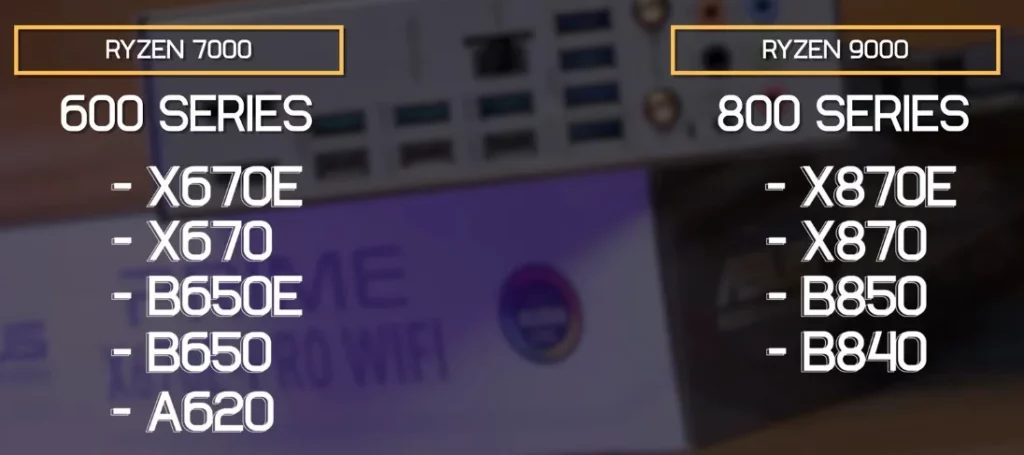
AMD launched the 600-series during the Zen 4 (Ryzen 7000) era: X670E, X670, B650E, B650, and A620.
Now, with the Zen 5 (Ryzen 9000) era, we have the 800-series: X870E, X870, B850, and B840.
The result: The same hardware is often rebranded as “new,” leaving consumers dizzy. The most absurd parts:
X870 is effectively a refined B650E.
B840 is essentially a rebranded A620.
B850 is nearly identical to B650, just with a few features now enforced as mandatory.
Let’s straighten this out once and for all.
The Solution: Think in “Families”
Don’t memorize nine names; just categorize them into three core families:
1. The High-End Dual-Chipset Family (Max Features, Premium Price)
X870E / X870 / X670E / X670
They share the same dual-chipset hardware architecture.
Offers the highest count of USB ports, SATA ports, and PCIe lanes.
Best for heavy productivity, massive storage arrays, and users requiring extensive expansion.
2. The Mid-Range Single-Chipset Family (The Sweet Spot for Value)
B850 / B650E / B650
These share the same single-chipset hardware.
Packed with enough features for the vast majority of users.
This is the focal point for most gamers and daily power users.
3. The Entry-Level Family (Budget-Oriented, Heavily Stripped Down)
B840 / A620
Features are significantly cut back.
No CPU overclocking support.
Ideal for strict budget builds or basic office PCs.
Core Differences: The 9-Chipset Comparison
1. CPU Compatibility
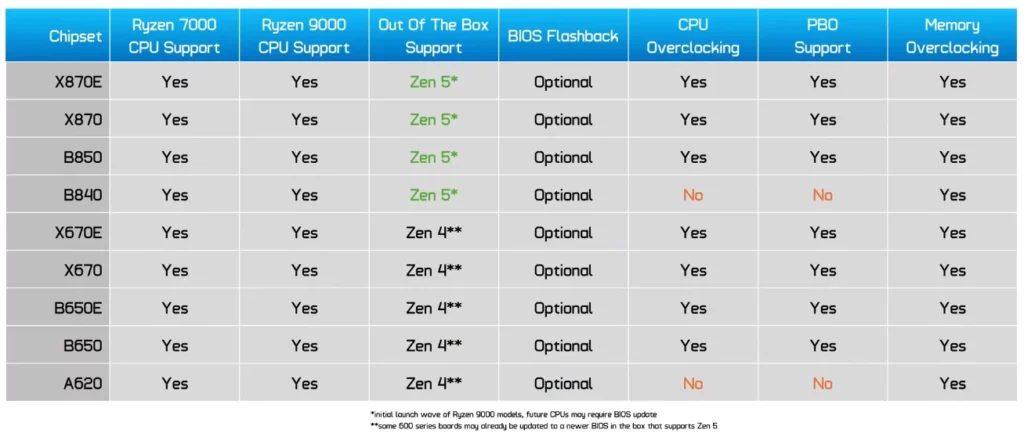
All AM5 boards (600 and 800 series) support both Ryzen 7000 and 9000 series.
800-series boards are compatible with Ryzen 9000 out of the box.
Most 600-series boards require a BIOS update (though most retailers now pre-flash them).
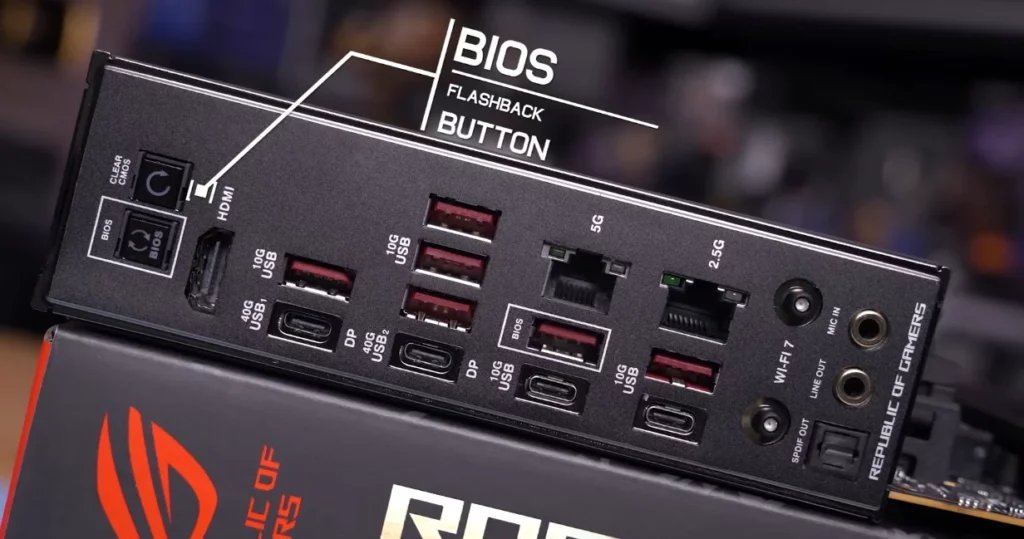
The good news: Almost all modern boards feature BIOS Flashback, allowing you to update the firmware without a CPU installed.
2. CPU Overclocking
No Overclocking: B840 and A620.
Supports OC + PBO: All other 7 chipsets.
Note: Even if a board supports OC, the quality of the VRM matters. Cheap B650 boards may have weak VRMs that limit your headroom.
3. PCIe 5.0 Support
Primary GPU Slot (x16):
Supports PCIe 5.0: X870E, X870, X670E, B650E.
PCIe 4.0 Only: X670, B850, B650, B840, A620.
Primary M.2 SSD Slot:
Mandatory PCIe 5.0: X870E, X870, B850.
Optional PCIe 5.0: B650E (varies by board).
PCIe 4.0 Only: All others.
The bottom line: If you want a PCIe 5.0 GPU and a blazing-fast SSD, prioritize X870E/X870 or the “E” variants of the older boards.
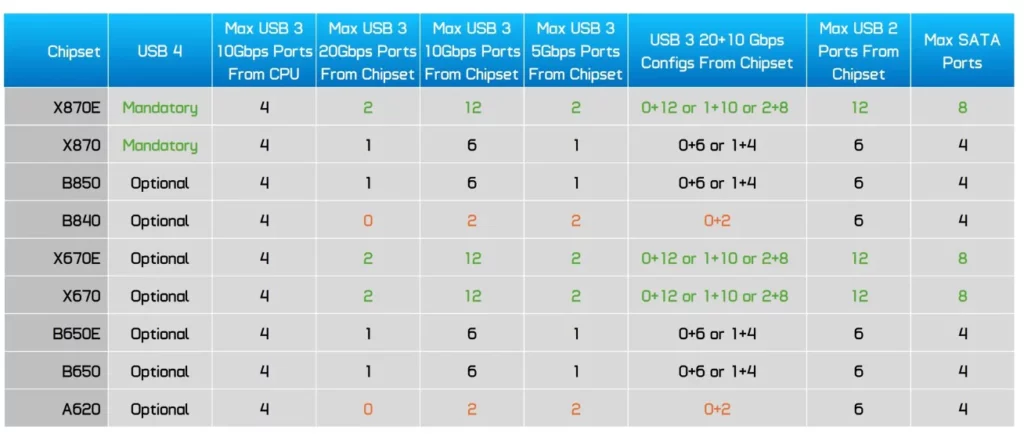
4. USB Connectivity
High-End (X870E/X870/X670E/X670):
Up to 2x USB 20Gbps + 12x USB 10Gbps + 2x USB 5Gbps.
X870E/X870 include mandatory USB4 support (usually two rear Type-C ports).
Mid-Range (B850/B650E/B650):
Up to 1x USB 20Gbps + 6x USB 10Gbps + 1x USB 5Gbps.
USB4 is optional.
Entry-Level (B840/A620):
Only 2x USB 10Gbps + 2x USB 5Gbps.
No USB 20Gbps or USB4 support.
Buying Advice: Which One Should You Pick?
The Top Choice (Value King): B650 or B850. Sufficient features, reasonable pricing, and mature BIOS support for 90% of gamers.
Performance & Future-Proofing: X870E or X670E. Necessary for workstation users, multiple high-speed M.2 drives, or extensive expansion cards.
Strict Budget: B840 or A620. Fine for office work or media consumption, but avoid these if you want to overclock.
Avoiding Pitfalls:
B840 sounds mid-range but is basically an A620. Don’t be fooled!
X870 is largely a refresh of the B650E; don’t overpay for marketing.
Within the same chipset, the difference between “high-end” and “entry-level” boards usually comes down to VRMs, build quality, cooling, and USB4 inclusion.
Summary
The AM5 platform isn’t as scary as it seems. Focus on the three tiers (Dual-chipset vs. Single-chipset vs. Entry-level) and evaluate whether you actually need PCIe 5.0 and USB4. If you’re interested in other hardware, check out my PC hardware channel.
Current recommendation:
For future-proofing: X870E.
For best value: B650 / B850.
On a tight budget: Skip B840, look for a deal on a solid B650 board instead.
FAQ
Q1: Is X870 better than X670E?
A: X870 enforces USB4 support; otherwise, it’s very similar to X670E. If you don’t need USB4, X670E often offers better value.
Q2: Can I overclock on a B840 board?
A: Absolutely not. Neither B840 nor A620 supports CPU overclocking or PBO.
Q3: Which chipset is best for beginners?
A: B650 or B850. They offer the best balance of features, cost, and stability for most users.