An evidence-based verdict on NVIDIA's DLSS 4.5: the new second-generation Transformer model improves lighting accuracy and kills ghosting, but real-world testing on RTX 5070, 4070 Super, 3090, and 2080 Ti shows a real performance cost. Essential reading for RTX 20/30 series owners deciding whether the visual upgrade is worth the frame-rate hit.
Nvidia has been making headlines at CES, not just with their latest GPU lineup, but with the announcement of DLSS 4.5. Nvidia promises that this new iteration utilizes a second-generation Transformer model, significantly improving lighting accuracy, reducing those annoying “ghosting” artifacts, and providing better overall temporal stability. Sounds like a dream come true for the fidelity-obsessed, right? But—and this is a big “but”—there is no such thing as a free lunch. After rigorous testing from enthusiasts on RTX 5070, 4070 Super, 3090, and 2080 Ti cards, a concerning truth has emerged: DLSS 4.5 sacrifices a significant amount of performance in exchange for those visual gains. If you’re rocking an RTX 40 or 50 series card, this might just mean a minor frame rate dip. But if you’re still relying on an RTX 30 or 20 series veteran, this update could potentially trigger a “negative optimization” disaster. Today, we’re digging into the technical reasons behind this and showing you exactly how to tweak your settings to dodge the bullet.Resources
The Technical Deep Dive: Why Older GPUs Struggle
Many of you are probably wondering, “Isn’t DLSS supposed to boost frame rates? Why is it making things slower?” Think of it like trying to run a modern, hardware-intensive AAA title on an aging PC—the hardware just can’t keep up.- The FP8 Factor: The DLSS 4.5 Super Resolution model utilizes FP8 (8-bit floating point) precision.
- The Hardware Gap: The latest GeForce RTX 40 and 50 series GPUs feature native hardware support for FP8 acceleration, allowing them to handle the computational load of the new model with relative ease.
- The Legacy Struggle: Unfortunately, the RTX 20 and 30 series lack dedicated FP8 hardware acceleration. This means they have to process the new model in a much less efficient way, causing performance overhead to skyrocket and ultimately negating the frame rate gains DLSS is meant to provide.
Benchmarks: The Performance Reality
To verify this, we tested games like Rainbow Six Siege, Cyberpunk 2077, and Black Myth: Wukong, comparing Native Resolution, DLSS 4 (Model K), and DLSS 4.5 (Model M) performance.1. RTX 40 / 50 Series: An Acceptable Trade-off
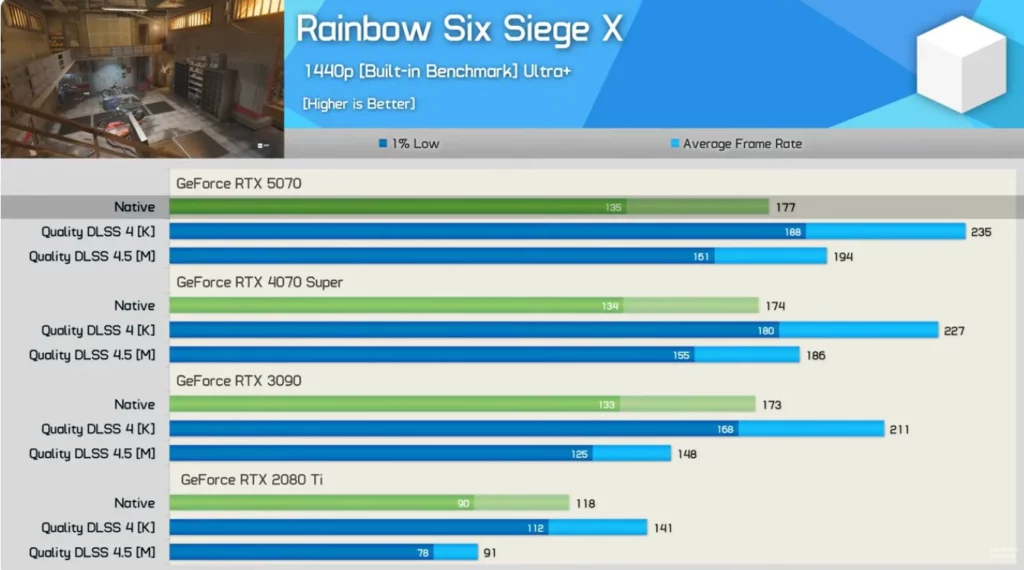
For modern GPU owners, DLSS 4.5 is indeed slower than DLSS 4, but it still maintains a performance lead over native resolution.- Rainbow Six Siege: On an RTX 5070, DLSS 4.5 delivers a 10% boost over native. While that’s a far cry from the 33% jump seen with DLSS 4, it’s still an overall performance gain.
- Overall Trend: On average, DLSS 4.5 is roughly 9% slower than DLSS 4 on an RTX 5070. Considering the image quality improvements, this is likely a trade-off many users will accept.
2. RTX 20 / 30 Series: A Performance Disaster
For users on older architectures, the data is disheartening. In some scenarios, enabling DLSS 4.5 is actually worse than running the game at native resolution.- Rainbow Six Siege (RTX 3090):
- Native 1440p: 173 FPS
- DLSS 4 (Legacy): 211 FPS (+22%)
- DLSS 4.5 (New): 148 FPS (14% slower than native!)
- Cyberpunk 2077 (RTX 3090): Frame rates on DLSS 4.5 dropped to 89 FPS, falling below native performance.
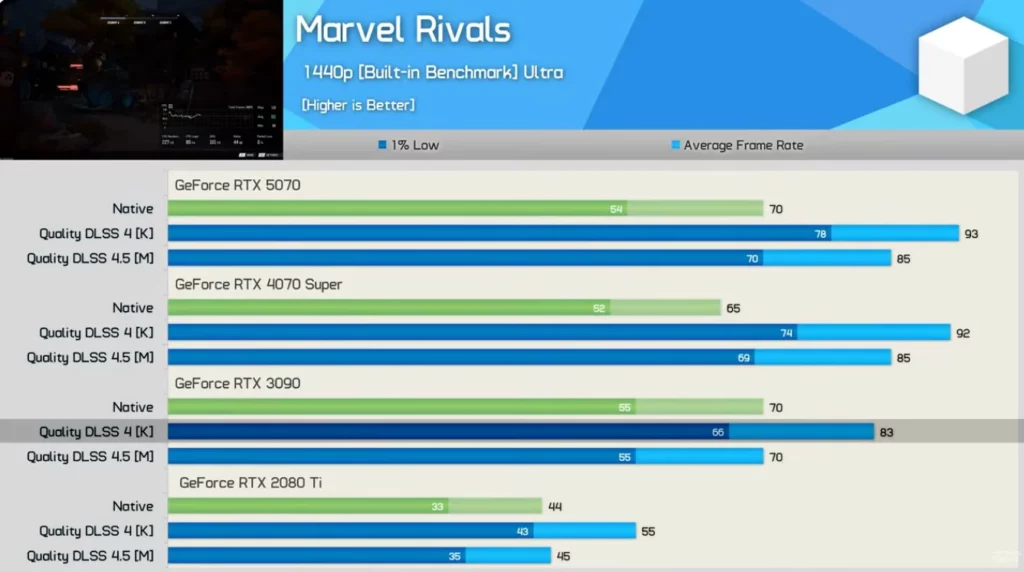
- Marvel Rivals: On both the RTX 3090 and 2080 Ti, performance gains with DLSS 4.5 were virtually zero, matching native frame rates.

How to Avoid the Pitfall: Overriding DLSS Models
If your games have automatically updated to DLSS 4.5 and you’re seeing your frame rates tank, don’t panic! You can manually roll back to the older model. You’ll need to use the Nvidia App (Beta) to force an override.Step-by-Step Guide:
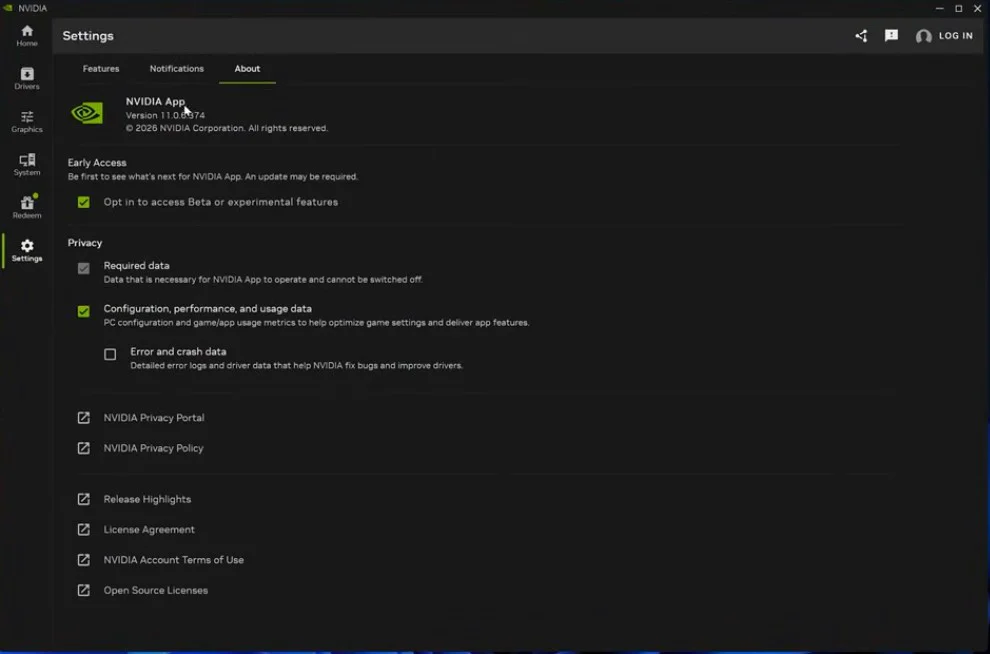
- Get the Tool: Ensure you have the latest Beta version of the Nvidia App installed (you must enable “Experimental Features” in settings and restart the update).
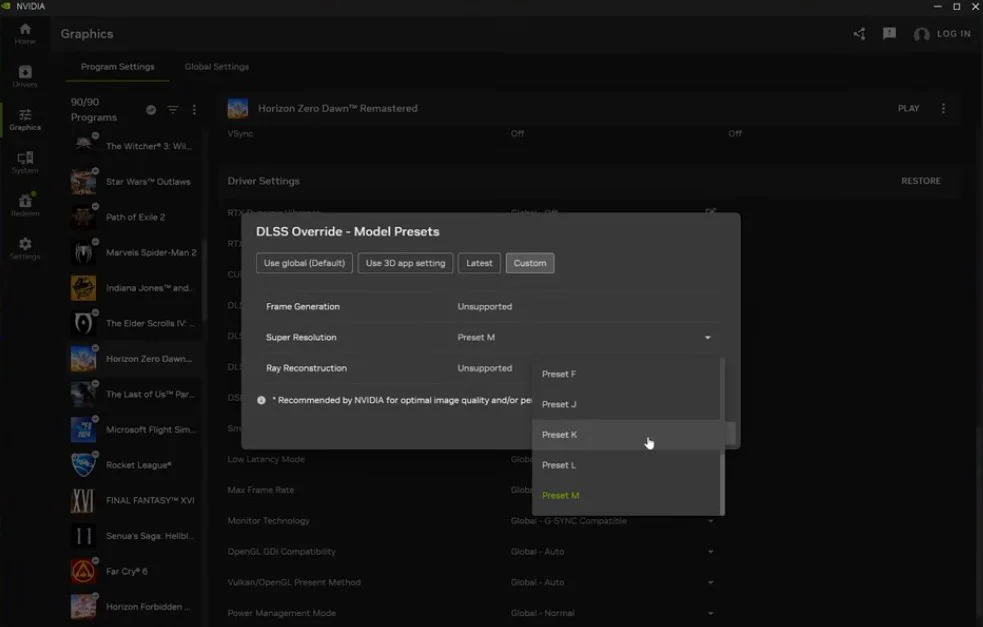
- Force Override: Navigate to the “Graphics” menu and locate “DLSS Override Model Presets.”
- Select Your Model:
- Model M / L: These are the new DLSS 4.5 models (better quality, worse performance). Older card users should avoid these.
- Model K / J: These are the legacy DLSS 4 models (best performance). We recommend locking these for older hardware.
- Verify: Press
Alt + Zin-game to open the overlay. Check your stats for the DLSS – SROVR (Super Resolution Override) status. If it displays the specific model (e.g., Model K), the override was successful.
Conclusion and Recommendations
Nvidia’s update takes a leap forward in image quality, but it definitely hits a snag regarding compatibility with older GPUs.- RTX 40/50 Series Owners: You’re in the clear. Try DLSS 4.5; while your frame rates might take a small hit, the superior lighting and reduced ghosting are likely worth the trade-off.
- RTX 20/30 Series Owners: Take my advice and avoid DLSS 4.5 (Model M). Unless image fidelity is your only concern at the cost of your frame rate, stick to manual overrides or wait for future optimizations.
- The Good News: DLSS 4.5 does not increase VRAM usage, so users with 8GB cards don’t need to worry about exceeding their memory limit.
FAQ:
Will my RTX 3060 experience performance drops with DLSS 4.5?
Highly likely. Tests show that because the RTX 20 and 30 series lack FP8 hardware acceleration, performance can drop significantly—sometimes even falling below native resolution. It is highly recommended to force an older DLSS model.
How do I check which DLSS model version my game is currently running?
Use the Nvidia App Beta. Press <code>Alt + Z</code> in-game to open the overlay, navigate to the "Statistics" section, and toggle to the DLSS view. The "SROVR" status in the top right corner will show you exactly which model (e.g., Model M or Model K) is active.
Does DLSS 4.5 consume more VRAM?
It does not. Benchmark data confirms that DLSS 4.5 VRAM usage is consistent with DLSS 4. You won't run into VRAM capacity issues simply by upgrading.