Why Your Older GPU Needs Optiscaler Client
Are you still struggling with stuttering in new games on your aging hardware? Whether you’re rocking a GTX 1080, 1080 Ti, RX 6700, or RX 6800, these former flagships are starting to show their age. Many modern titles don’t play nice with FSR3, let alone the latest FSR4. Manually downloading files from GitHub, copying DLLs game-by-game, and managing overrides is a tedious, error-prone mess.
The Pain Points:
- Older cards lack native support for the latest upscaling tech
- FSR4 INT8 usually requires manual injection—a total headache
- Every Optiscaler update forces you to repeat the same repetitive tasks
- LSS Swapper hasn’t integrated FSR4 INT8
Enter Optiscaler Client (the evolved version of the Optiscaler Manager). It turns those tedious tasks into a matter of seconds.
What is Optiscaler Client? Key Upgrades Explained
Optiscaler Client is a purpose-built utility for managing your upscaling plugins. It handles the heavy lifting, including automated injection, batch processing, and version switching.
Top New Features:
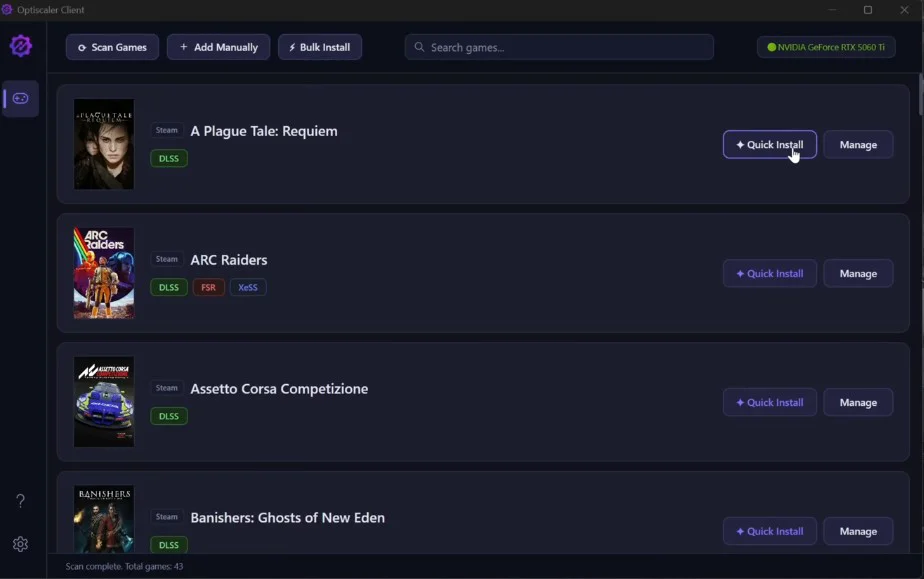
- Quick Install: Select your game and install with one click
- Auto FSR4 INT8 Injection: Specifically optimized for older, non-RDNA4 GPUs
- Bulk Install: Upgrade your entire library in one go
- Advanced Manage Panel: Fine-tune which version of Optiscaler or FSR4 INT8 each game uses
- Full support for latest Beta versions (including XCSS frame gen)
- Smart GPU detection for recommended version presets
In short, what used to take half an hour now takes less than 3 minutes.
Download link: https://github.com/Agustinm28/Optiscaler-Client/releases/tag/OptiscalerClient-1.0.3
3-Minute Quick Start Guide
1. Download & Run
- Search for Optiscaler Client on your browser.
- Grab the latest Release from GitHub.
- Extract and run the .exe file.
The UI is incredibly clean and automatically detects your installed games.
2. Scan & Quick Install
- Click Scan Games to detect your library.
- Each entry clearly shows compatibility (LSS? FSR?) and current installation status.
- Click Quick Install to patch it instantly.
The Workflow:
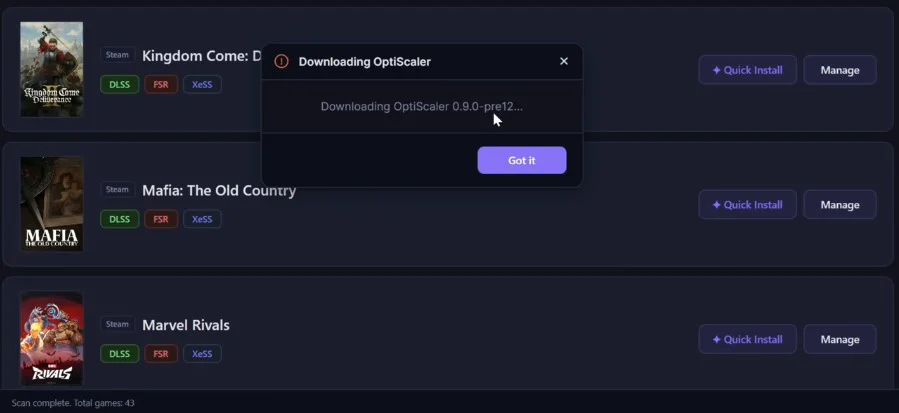
- Select Kingdom Come: Deliverance → Quick Install → Download & Inject → Done!
- The entire process takes 3-10 seconds.
3. The Manage Panel
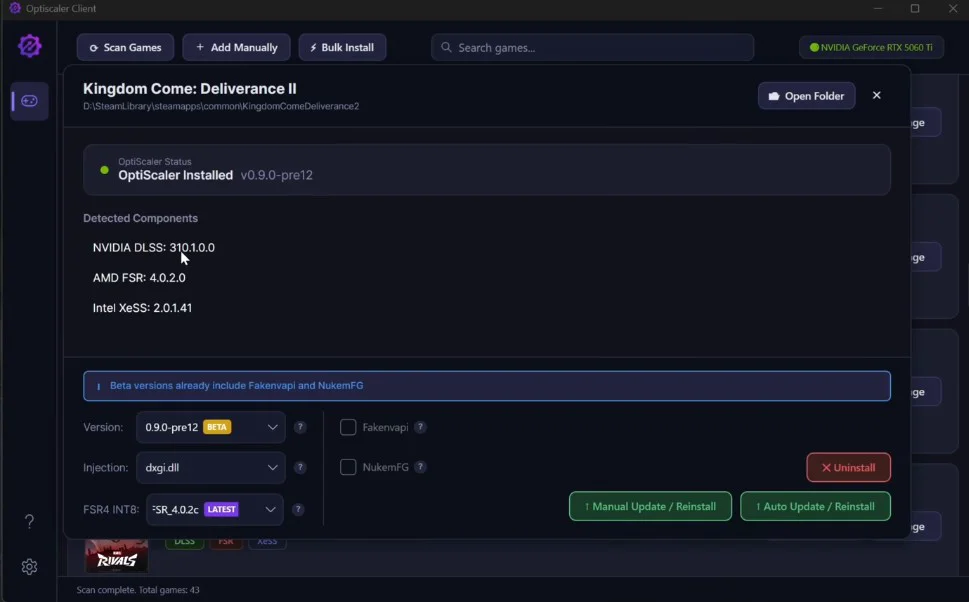
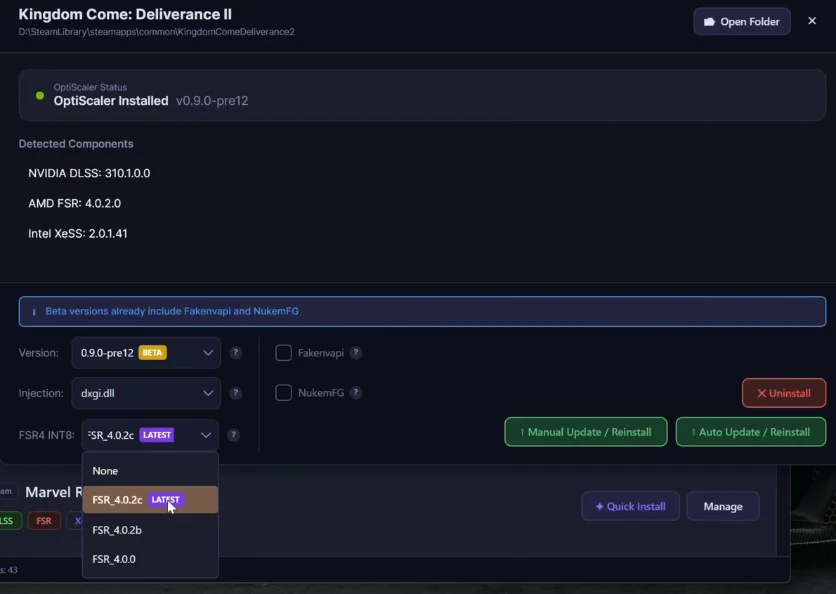
Use the Manage tab for granular control:
- Optiscaler Version: Toggle between stable or bleeding-edge versions
- Upscaler: Switch between LSS, FSR3, or FSR4 INT8
- FSR4 INT8 Version: 4.0.0, 4.0.2b, or 4.0.2c (highly recommended for RX 6000/7000 stability)
- Injection Mode: Choose between WinMM (recommended for Vulkan) or XGI
Pro Tip: For AMD RX 6000 and 7000 users, set FSR4 INT8 to 4.0.2c in the Manage panel and hit Auto Install / Reinstall for the best experience.
Batch Processing: The Real Time-Saver
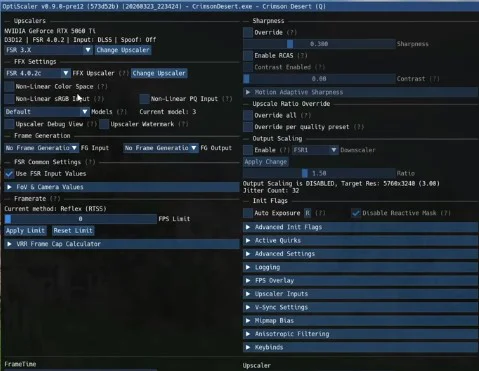
This is my favorite feature. Select multiple games, hit Bulk Install, toggle Optiscaler + FSR4 INT8, and watch it work. Once finished, launch your game and press Insert to bring up the menu and verify your upscaler is active.
GPU Compatibility Table
| GPU Series | Recommendation | Notes |
|---|---|---|
| NVIDIA (10/20/30/40 Series) | Stick with LSS | Highest stability and frame rates |
| AMD RX 6000 / 7000 | Quick Install + FSR4 INT8 4.0.2c | Bring FSR4 to older AMD hardware |
| Intel ARC | Manual select FSR4 INT8 | Requires minor tweaking |
Note: NVIDIA users generally see better results with LSS, but feel free to experiment with FSR4 if you want to see the difference.
Crucial Warnings
- Prioritize Single-Player: This works perfectly for most offline games.
- Online Anti-Cheat Caution: While games like Marvel Rivals, No Man’s Sky, and Palworld haven’t triggered bans during testing, anti-cheat policies vary. Use at your own risk.
- Test thoroughly in offline titles first.
Why Optiscaler Client Beats LSS Swapper
LSS Swapper is a solid tool, but it lacks support for FSR4 INT8. Optiscaler Client provides a unified experience, bridging the gap between official and modded tech with automation. It’s the ultimate lazy-gamer’s tool for modernizing legacy hardware.
Summary
Stop manually swapping DLLs. Optiscaler Client breathes new life into your GTX 1080 or RX 6700, letting you leverage the latest FSR4 INT8 tech with ease. If you’re tired of the manual grind, this is the tool you’ve been waiting for.
FAQ
Q1: Is Optiscaler Client free?
A: Yes, it is a completely free, open-source tool available on GitHub.
Q2: Is FSR4 INT8 4.0.2c stable on RX 6700 XT?
A: Yes, community feedback confirms 4.0.2c is the most stable version for the RX 6000/7000 series.
Q3: Can I use this for online multiplayer games?
A: It works for some, but use caution. Anti-cheat systems vary; stick to single-player titles to be safe.