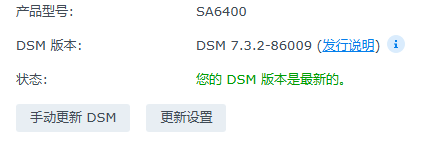
Many Xpenology users running the RR (RedPill) loader have been caught off guard by the “Upgrade to DSM 7.3” prompt. In a moment of distraction, they click update without a proper backup. The result? The system seems to boot, but it’s completely invisible on the local network—Ping fails, and you’re effectively locked out.
If you were running RR Loader + DSM 7.2.2 and lost access after an accidental 7.3 update, don’t rush to reinstall the OS. With a few simple configuration tweaks, you can likely recover your system and complete the upgrade without losing your data.
Prerequisites
Before you begin the rescue operation, you need direct console access to your NAS:
Bare Metal: Connect a monitor and keyboard directly to your NAS.
Virtual Machine (ESXi/PVE): Open the VM console interface directly from your hypervisor.
Step-by-Step Recovery
Step 1: Access the RR Configuration Menu
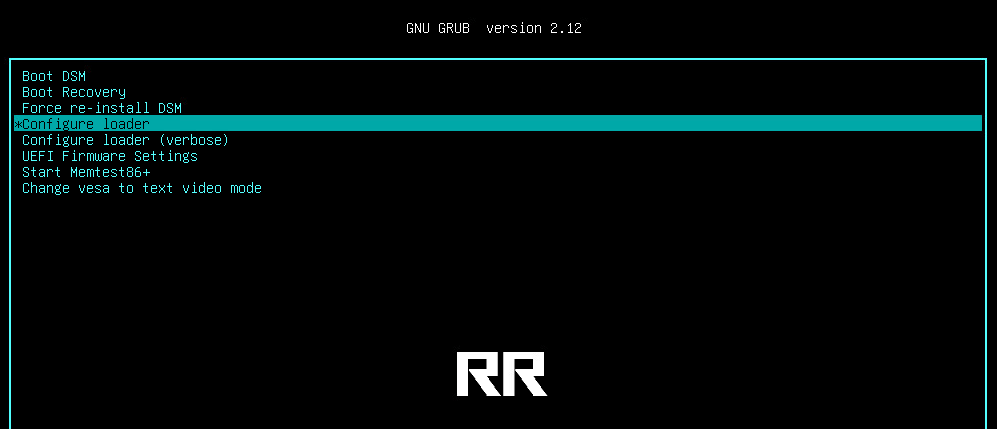
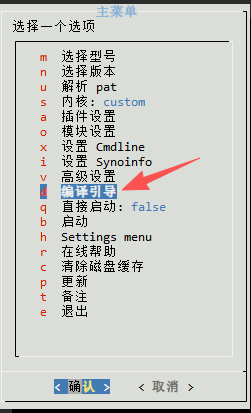
Reboot your NAS. As soon as the boot screen appears, quickly tap the arrow keys on your keyboard to interrupt the automatic boot. In the boot menu, select Configure Loader and hit Enter.
Step 2: Update the RR Loader Version
Once inside the config menu, it’s best practice to perform an update on the RR loader itself to ensure full compatibility.
Locate the Update option and run it to ensure your RR loader is running the latest version.
Step 3: Re-select the DSM Version
Return to the main menu:
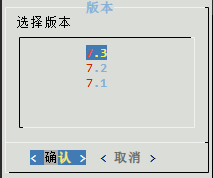
Navigate to Choose Model/Version.
From the list, explicitly select DSM 7.3.
Step 4: Modify Kernel Settings (CRITICAL)
This is the most important step; many users lose connectivity because the default kernel isn’t compatible with the new version.
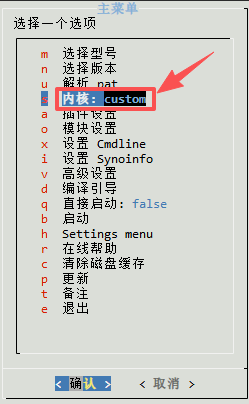
Find the Cmdline or Kernel settings.
Manually change the Kernel option to Custom. Note: Do not use the default; you must manually set this to Custom.
Step 5: Build and Boot
Once configured, select Build the Loader.
After the build finishes, select Boot.
Step 6: Verify Recovery
It may take a few minutes for the system to boot up. Once you’ve waited, try to Ping the NAS IP from your workstation.
Result: If the Ping succeeds, your network stack is restored.
Login: Access your DSM via a web browser. You should find your system has successfully updated to 7.3.
Post-Upgrade: Some packages might show as “incompatible.” Simply uninstall them and reinstall the latest versions; your data and settings should remain intact.
Best Practices and Summary
Key Takeaway: The secret to fixing an unreachable 7.3 update is setting your loader kernel to Custom.
Stability Over Features: Remember, Xpenology isn’t a commercial Synology box. If your current version (like 7.2) is stable, avoid updating.
Backups are Essential: If you absolutely must upgrade, always back up your loader configuration, system settings, and critical data first.