This article is compiled based on Docker’s official repository, documentation, and example directories (verified on October 8, 2026).
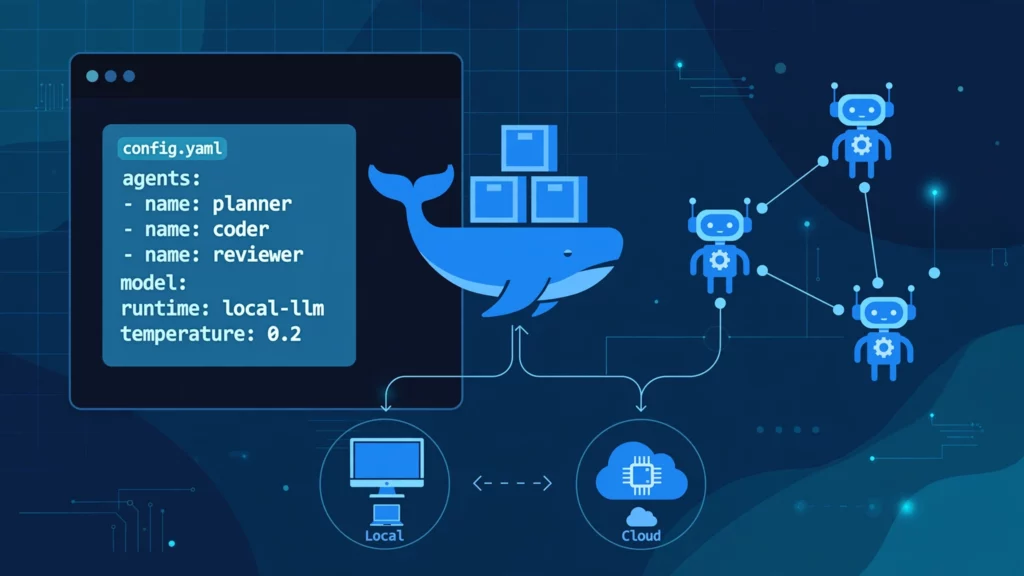
In a nutshell: Docker’s official open-source agent runtime tool (Apache-2.0). Define your models, instructions, and tools in a single YAML file, spin it up with a simple docker agent run command, and seamlessly connect to either cloud models or local models via Docker Model Runner—meaning no API keys required and zero data leaves your local machine.
The Pain Point: Writing Mountains of Glue Code Just to Build an Agent
Usually, when you want an LLM to read files, execute commands, or fetch data by stitching together your own framework, the workflow looks like this: pick an SDK, write JSON schemas for your tools, code the orchestration logic, implement chat loops, and handle streaming outputs. Change the model, and all that glue code needs a rewrite. Want to share your shiny new agent with someone else? They have to painstakingly clone a README and set up an environment.
Docker Agent takes a completely different path: Configuration over code. The official stance is straightforward—it wants running an AI agent to feel just like spinning up a container with docker run. Definition, execution, and distribution all follow your familiar workflows.
What Problems Does It Solve?
Multi-Agent Collaboration: A coordinator agent can manage specialized worker agents—like one for writing code and another for reviews—handling task delegation automatically.
Ready-to-Use Toolsets: Built-in toolsets for filesystems, shells, memory, to-do lists, and web scraping, plus compatibility with any MCP (Model Context Protocol) server, including ready-to-use services from Docker’s MCP catalog.
Swap Models at Will: Switch effortlessly between cloud providers like OpenAI, Anthropic, Gemini, AWS Bedrock, and Mistral, or local runners like Docker Model Runner and Ollama, simply by tweaking a single model: line.
Distribute Like Container Images: Push your agents to any OCI registry. Teammates can pull and run them with a single command, adopting the exact same mental model as traditional Docker images.
Flexible Execution Modes: Use the interactive TUI (Terminal User Interface), execute one-off CLI commands, fire up an HTTP API service, or run in MCP server mode—all using the same YAML configuration just by changing the entrypoint.
It acts as a great complement to tools we’ve covered previously: Agent Reach solves the “blind spot” of agents lacking internet access, while Docker Agent tackles how agents are built, run, and shared. Its built-in document retrieval capabilities also contrast with dedicated knowledge base platforms like WeKnora—where one is a general-purpose runtime framework with search features, and the other is purpose-built solely for knowledge bases.
Prerequisites to Keep in Mind
System Requirements: A Docker environment is required. Docker Desktop 4.63 and above comes pre-packaged with this plugin, meaning you can jump straight into using docker agent. Alternatively, you can install it standalone via Homebrew or official binaries.
Model Backend (Pick One):
Cloud Route: Prepare at least one provider’s API key (pay-as-you-go).
Local Route: Enable the Docker Model Runner feature in Docker Desktop—no keys, no fees, though it relies heavily on your local hardware specs.
Hardware (Local Route Only): There’s no one-size-fits-all answer here; it entirely depends on the model size you pull. Smaller parameter models demand less RAM but sacrifice response quality. If you expect a local model to reliably call tools, parse files, and manage multi-step tasks, overly small models will likely stumble. A safe approach is to start with the official default small model to verify the workflow, then scale up based on your rig’s capabilities.
Windows User Note: Container and GPU workflows for Docker Desktop on Windows share the same underlying architecture as WSL containers. Real-world performance and VRAM usage for local models under this setup haven’t been extensively benchmarked in this article yet and require further validation.
Getting Started in Four Steps
1. Verify the Plugin is Installed
dockeragent--helpdockeragentdoctor
The second command is the official health check utility: it reports credential statuses for various model services, checks if the local Model Runner is reachable, and lists currently pulled models. Fix any issues here before you start tweaking your YAML files.
The first command confirms the Model Runner is active, and the latter two pull and inspect your local models. According to the official documentation, if no cloud API key is configured, running an agent will automatically prioritize locally pulled models.
3. Write Your First YAML
For the cloud route, the minimal setup requires declaring the model, description, instructions, and toolsets:
If you want to add search tools, simply append an MCP toolset—such as the containerized DuckDuckGo MCP service referenced in the official README. Always store API keys in environment variables rather than hardcoding them into your YAML, a best practice heavily emphasized in official documentation.
4. Fire It Up
dockeragentrundockeragentrunagent.yamldockeragentrun--execagent.yaml"Help me analyze this error log"caterror.log|dockeragentrun--execagent.yaml"Where is the bug in this log?"
Running without arguments drops you into an interactive session. Adding --exec performs a one-off task, perfect for embedding into scripts. You can also use docker agent new to interactively bootstrap a new configuration file if you aren’t sure where to start. The official examples directory contains hundreds of ready-to-use configurations—covering single agents, multi-agent teams, document retrieval, MCP integrations, and permission sandboxes. Copying and tweaking an existing sample is infinitely faster than starting from a blank file.
Troubleshooting Common Issues
Q: The docker agent command is missing?
A: First, ensure your Docker Desktop version is up to date (the plugin is only pre-installed in version 4.63+). If you installed the standalone binary, make sure the executable is placed in Docker’s plugin directory or run it as a standalone command.
Q: Cannot connect to the local model / getting an empty endpoint error?
A: Check these sequentially: Is the Model Runner feature enabled? Does docker model status --json return normally? Is your active Docker context pointing to the local engine? Official troubleshooting docs note that if a connection fails, it won’t silently fallback to another local runner; the error message will explicitly specify the connection name to help you debug.
Q: Local small models fail to use tools or give irrelevant answers?
A: This is almost certainly a model capability limitation rather than a configuration bug. Tool calling requires robust reasoning skills. Start by verifying simple text-only configurations without toolsets on smaller models, and gradually add toolsets later. Alternatively, offload critical agents to cloud models and keep local models scoped to non-sensitive sub-tasks.
Q: Can I connect my own documents for Q&A?
A: Yes. The built-in retrieval toolsets support keyword search, vector search, hybrid search, and reranking strategies. Complete document Q&A configs can be found in the examples directory. However, if your primary core requirement is an enterprise-grade knowledge base platform, a dedicated system is still a better choice; the search features in general-purpose frameworks are designed to be “good enough.”
Q: Is giving an agent shell tool access safe?
A: This is arguably the riskiest feature and demands extreme caution. The official examples include dedicated safety modes and sandbox configurations: file access can be restricted via allow/deny lists, and shell commands can be executed inside containerized sandboxes. The golden rule: Grant only the minimum permissions required to complete the task—don’t expose your entire disk and allow arbitrary commands just for the sake of convenience.
Three Realities to Keep in Mind (Cold Water)
Extremely Rapid Iteration: The repository already has over two hundred release versions, with frequent changes to features and configuration nuances. This article is based on documentation from October 8, 2026. Be sure to skim the latest docs and examples before copying commands blindly.
Local Models Save Money, Not Headaches: Skipping API fees means your performance depends heavily on your hardware and model choice. Complex multi-agent collaborations aren’t friendly to small local models—manage your expectations accordingly.
YAML is Simple, Debugging Isn’t: Misconfigurations, incorrect tool permissions, or wrong model choices often manifest as identical error symptoms. The official CLI provides tools to test individual components in isolation; troubleshoot by breaking down tools and models separately rather than running the full team out of the gate.
Who Is This For? / Who Should Avoid It?
Ideal For: Developers already utilizing Docker who want a low-barrier entry to testing AI agents; homelab enthusiasts looking to package internal utilities into shareable agents; privacy-conscious users aiming to run everything 100% locally.
Not Ideal For: Teams needing deep customization of inference logic or embedding agents into core product pipelines—writing your own framework gives you better control. Also not recommended for users who completely wish to avoid the command line.
Bottom Line
Docker Agent transforms building AI agents from writing custom code into filling out configurations: models, tools, and teammates are all declared in YAML, while execution and distribution leverage familiar Docker workflows. While it’s iterating fast and bound to have a few rough edges, for anyone already living within the Docker ecosystem, it’s currently one of the lowest-friction ways to dive into agent engineering. Definitely worth spending an afternoon exploring.