

By January 2026, there are few tools left that allow you to run the entire pipeline—downloading, audio separation, subtitling, translation, and zero-shot voice cloning—locally and for free. Voice-Pro currently stands out as the most accessible and feature-rich option for Windows users. [GitHub Repository]
Core Pain Points: Why People Still Pay for Cloud Services
| Requirement | Cloud Services (ElevenLabs/Play.ht, etc.) | Voice-Pro (Local) | Winner |
|---|---|---|---|
| Monthly Cost (5h usage) | $50~$200+ USD | $0 (excluding electricity) | Local |
| Privacy | Materials uploaded to cloud | 100% Local | Local |
| Max Duration per Task | Credit/Character limits | Theoretically Infinite | Local |
| Zero-shot Cloning (Chinese) | ★★★★★ | ★★★★☆ (CosyVoice/F5) | Cloud |
| Ease of Deployment | Plug & Play | 30~60 mins initial setup | Cloud |
| Performance (6GB+ VRAM) | 1~3x Real-time | 1.5~8x Real-time (Model dependent) | Local |
| Voice Variety | Hundreds of official/paid clones | Unlimited custom + community packs | Local |
Bottom line: Once your monthly voice generation exceeds 3~4 hours, or if you are sensitive to privacy and costs, Voice-Pro becomes the clear winner.
Deployment: The Most Robust Path for Windows (Avoiding 99% of Beginner Pitfalls)
Minimum Spec: RTX 3050 4GB / 16GB RAM / SSD → Barely usable (lightweight models only). Recommended: RTX 4060Ti 8GB / 32GB RAM → Smooth performance for most tasks. Enthusiast Spec: RTX 4090 24GB → Run multiple heavy models simultaneously for blazing-fast batch processing.
Actual Deployment Time (January 2026 Testing, stable connection)
- git clone / downloading zip → 30 seconds
- configure.bat (dependencies + base models) → 18~45 minutes
- First-time launch (loading large models) → 10~25 minutes
- Subsequent launches → 15~60 seconds
Bulletproof Steps (Copy-Paste Ready)
- Open Command Prompt (as Administrator).
- Run the following commands:
git clone https://github.com/abus-aikorea/voice-pro.git
cd voice-pro- Double-click configure.bat. Don’t panic if it hangs on a package; it’s normal. Common bottlenecks: torch, xformers, triton, flash-attn.
- Double-click start.bat. Success indicator: The terminal shows ‘Running on local URL: http://127.0.0.1:7860’.
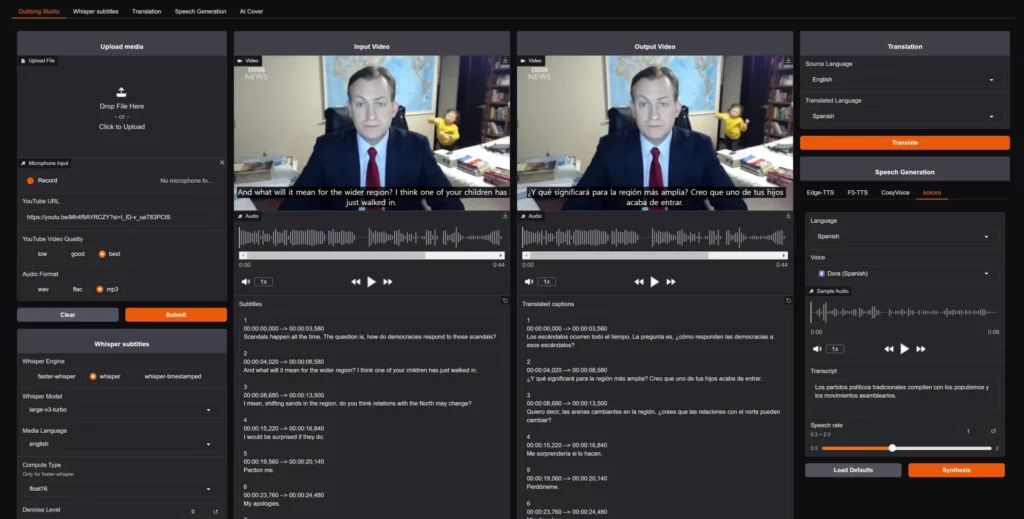
Model Comparison Chart (Cheat Sheet)
| Model | Chinese Naturalness | Cloning | Speed (RTX 4060Ti) | VRAM | Best For |
|---|---|---|---|---|---|
| Edge-TTS | ★★☆ | None | Ultra-fast 15x+ | ~1GB | Quick tests, simple lip-sync |
| kokoro v1 | ★★★★ | Weak | Fast 6~10x | 3~4GB | Daily voiceovers, podcasts |
| CosyVoice-300M | ★★★★☆ | ★★★★★ | Mid 2.5~4x | 6~8GB | Zero-shot cloning |
| F5-TTS | ★★★★ | ★★★★☆ | Fast 4~7x | 5~7GB | Balance of speed & quality |
| E2-TTS | ★★★★ | ★★★★ | Mid 3~5x | 6~9GB | Long-text stability |
Recommended Combo: Daily use: kokoro (Primary) + CosyVoice (Swap for cloning tasks).
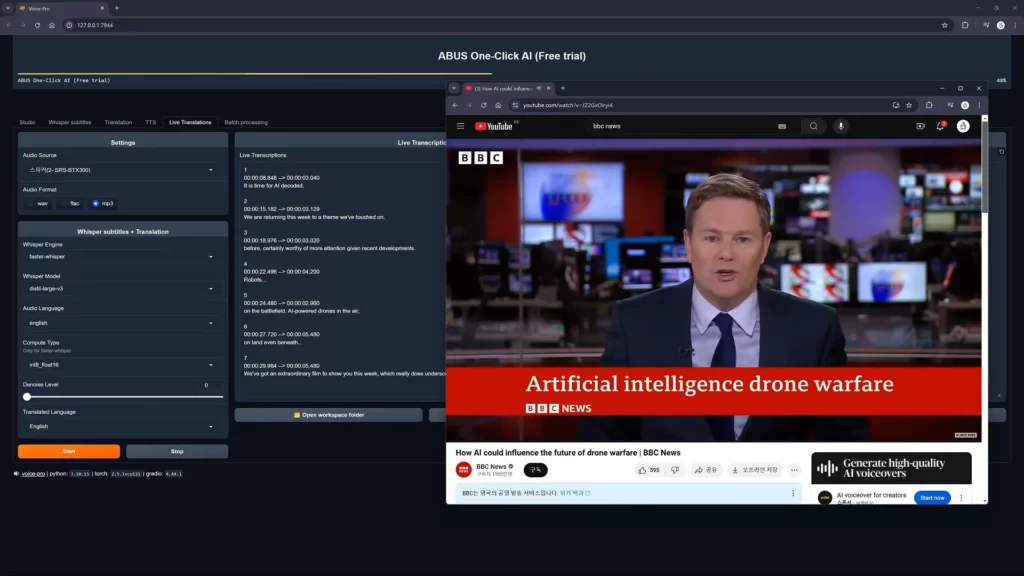
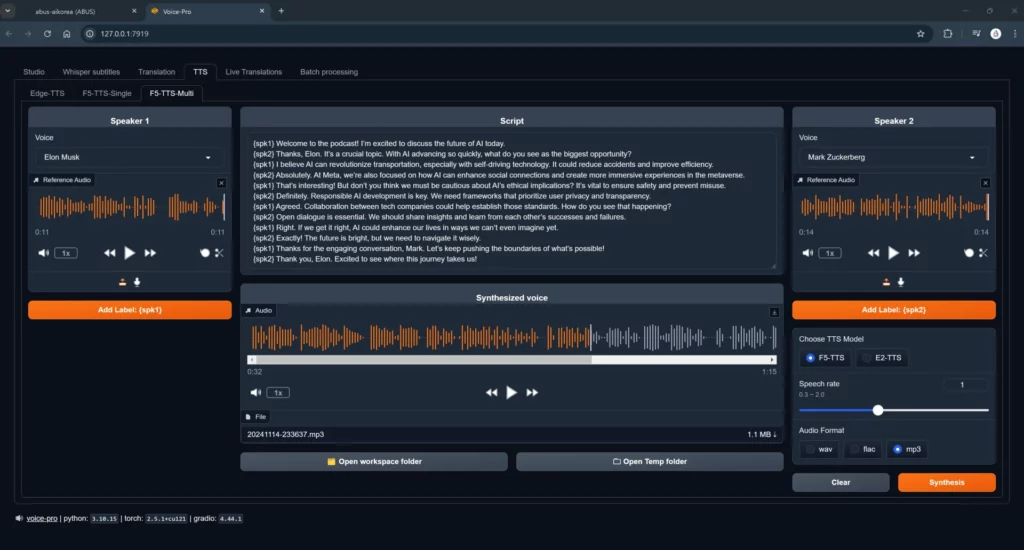
Top 8 Troubleshooting Tips
- CUDA out of memory: In Settings, change computation type to ‘float16’ or ‘int8’; close other apps.
- Configure stuck on torch: Manually install via:
pip install torch==2.4.1+cu121 torchvision torchaudio --index-url https://download.pytorch.org/whl/cu121 - Download failures: Change source in Settings to ‘hf-mirror’ or ‘modelscope’.
- Whisper alignment issues: Use ‘whisper-large-v3-turbo’ or ‘whisperX’, enable VAD + noise reduction.
- Missing celebrity voices: Search by names directly (e.g., ‘Elon’, ‘IU’).
- Black screen/No response: Check firewall/antivirus exclusions or try a different browser.
- Robotic/Explosive sound: Enable ‘Emotion Control’ and set ‘Temperature’ to 0.75~0.9.
- Update issues: Delete the ‘venv’ folder and run ‘configure.bat’ again.
Summary – January 2026 Verdict
Deploy now if: Your monthly bills exceed $50, you need frequent zero-shot cloning, or you prioritize total privacy/commercial data security.
Areas for improvement: In extreme cases (rapid speech + intense emotion), it still trails slightly behind ElevenLabs Turbo v3.
Next steps: Master kokoro + CosyVoice, build a library of 30s-2m clean audio samples, and upgrade your VRAM to unlock batch processing.
For those with poor connection speeds: [Quark Cloud Download]